
Exporting Grades
You can export Turnitin grades directly from the Turnitin Assignment Inbox, or from the Blackboard Gradebook. Both methods export grades, but other included data is different.
Turnitin exports contain:
- Last Name
- First Name
- Email Address
- Turnitin User ID
- Title of the uploaded file
- Turnitin Paper ID
- Date Uploaded (this only currently records the date and time of the first file uploaded - not subsequent submissions)
- Word Count
- Grade
- Originality Score
Blackboard Ultra reports contain:
- Last Name
- First name
- Student ID
- Assessment Title
*It is not possible to export grades with student names while anonymity still enabled. In Turnitin, you can download a spreadsheet with Paper ID and Grade, but no user details are included. In Blackboard, the downloaded file will list all papers as unmarked until the feedback release date passes.
If you need to release anonymity for a class early, you must bring the Feedback Release Date forward. This will make all grades and feedback immediately available to students. You can then export these as a spreadsheet to upload to SOLE.
If you choose to bring forward the Feedback Release Date, you will need to hide the submission point from students in Blackboard, otherwise they will be able to access their grades early!
Students should be reminded that grades and feedback released in Turnitin remain provisional until they are released in SOLE.
* If you intend to use the downloaded spreadsheet to populate grades in SOLE, you should first check that there are no outlying or missing grades which may be incorrect! You should also ensure that students who have left or changed courses are also not included.
Exporting Grades from Turnitin
To download the grades from Turnitin, you can download the Grade Report. To do this, access the Turnitin submission point. From the Assignment Inbox, click on the Download All button and choose Grade Report:
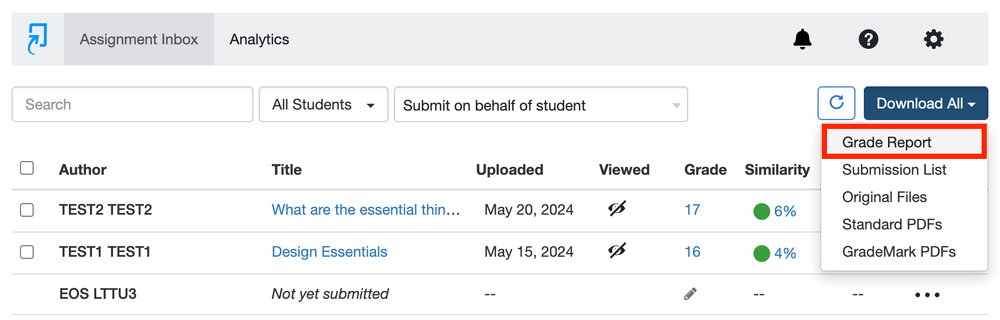
The report will be automatically downloaded to your computer as a spreadsheet file.
Exporting Grades from Blackboard
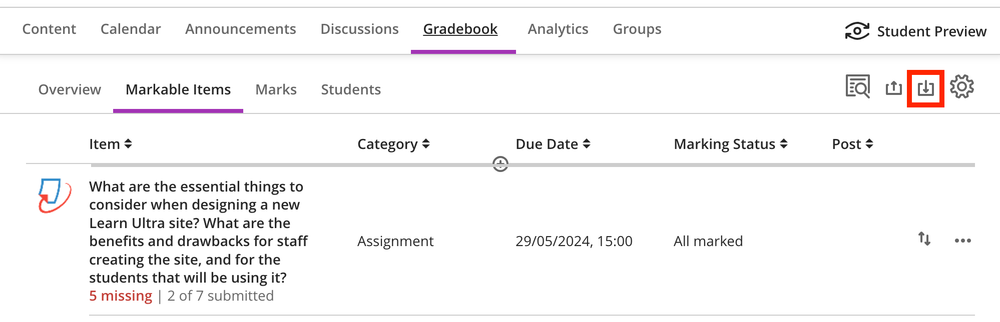
To export from Blackboard Ultra, access the Gradebook and click on the Download Gradebook button:
In the panel that opens, select the Turnitin assignment you want to download the grades for and click the Download button:
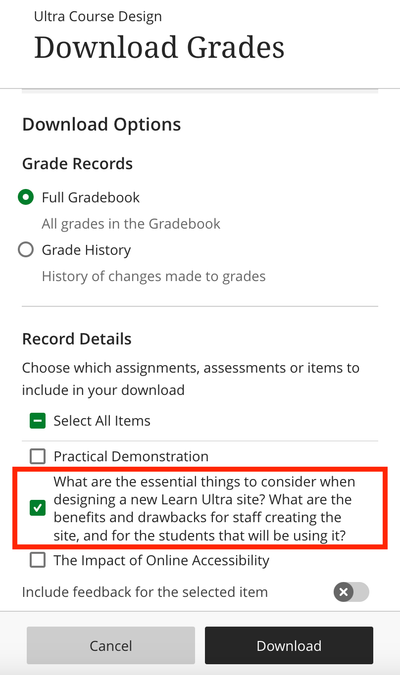
The grades for the assignment will be downloaded to your computer as a spreadsheet.