
Troubleshooting Problems
The list below contains the most common problems encountered when using the Turnitin system, as well as the easy fixes that can be applied.
Known Issues
Turnitin maintains lists of known issues that can affect this service. Workarounds are listed where identified. Links to these pages are listed below:
Tutors can also check the Turnitin Status Page to view information on outages and scheduled
maintenance.
Providing a submission fallback when Turnitin is unavailable
As Turnitin is a fully online system, there may be occasions when the service is not available (for example when undergoing maintenance or in case of other outages). In this instance, you will need to implement the fallback procedure below to allow students to submit work before the deadline without penalty.
If students cannot submit to Turnitin because the system is unavailable, they must email a copy their work directly to the tutor before the deadline to be marked as a first attempt. Archive the email containing the original work and the file that was shared by the student to preserve the audit trail. This can then be used to confirm that work was submitted before the deadline.
File Problems
ONLY certain files will be accepted by Turnitin. The most common include:
- files less than 100MB
- files with a minimum of 20 words
- file less than 800 pages
- Microsoft Word (DOC and DOCX)
- Plain text (TXT)
- Rich Text Format (RTF)
- Portable Document Format (PDF)
- OpenOffice (ODT)
- PowerPoint (PPTX)
- Google Docs via Google Drive
If you are using an unsupported file type, you will need to save or export to PDF, plain text (.txt) or tich text format (.rtf).
A full list can be found at the File Requirements page on the Turnitin support site.
No Originality Report Available
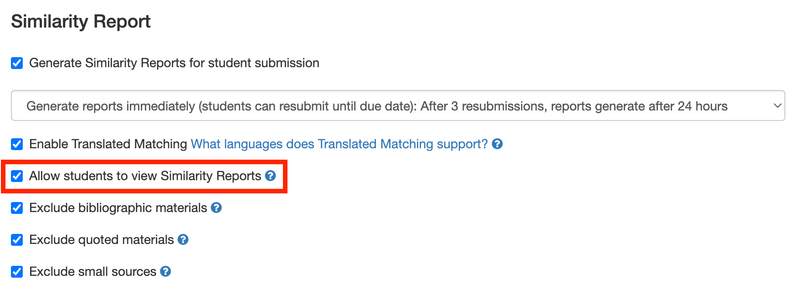
If students are unable to see their originality report, make sure that this option is enabled in the Optional Settings within the Similarity Report section:
Students unable to submit more than one attempt
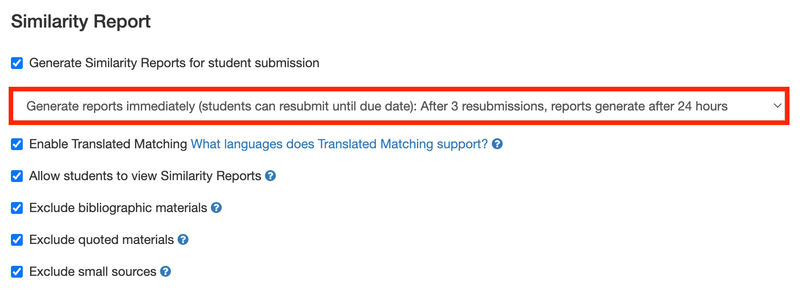
Standard settings should be Generate reports immediately (students can resubmit until due date):
After 3 resubmissions, reports generate after 24 hours.
Submissions taking a long time to process
Processing time to generate originality reports and convert documents for online marking can range from a few seconds to several minutes during peak times. Students are advised to allow plenty of time before the deadline to allow work to uploaded successfully. Submissions will be time stamped with the date and time the file upload was completed - not the date and time the upload was started.
Turnitin supports file sizes of up to 100MB. Large files can take additional time to upload depending on the speed of the internet connection used.
Submission Not Processed
Sometimes a file will be submitted, but not processed. There will be no originality report, and the document will not be converted for use with online marking using the Feedback Studio. You may be presented with the error code M14:11. This is usually because the document contains large graphics, large images or formatting that Turnitin couldn’t access. Unfortunately there is no way to fix this without saving the original document to a format such as Rich Text Format, Plain Text or by converting it to a PDF. However this will overwrite the previous version as well as time/date submitted (and will appear as late if the deadline has already passed).
To manage these papers you will need to download the original file, mark them offline and email the grade and feedback you have added to the paper to the student on the feedback release date.